Yesterday morning I came across the Computer History Museum archive of the Photoshop 1.0 source code (released in 2013), and decided to see how well an LLM-agent would do at porting it.
The idea came from Simon Willison's blog post about using GPT-5.2 to port JustHTML from Python to JavaScript.
The full transcript is available here.
Initial prompt
The original source code to photoshop 1.0 has been donated to the computer history museum. It is in original-source dir. Your mission: A faithful FULL port of this to the web using the most simple/standard web technologies as makes sense for this project. Put together a plan for creating a FULL 1:1 port, a detailed checklist of EVERY component to port, and a good order to start.
I followed up with instructions to maintain a checklist and continue growing it as needed:
Put that into a chekclist and start building until you're done. Every time you finish a task, check it off the checklist (in a file). Every time you notice more work to do you can add to the checklist.
From there I repeated the following prompt 4 times:
MISSION: Continue until the full 1:1 port is done. Just keep going.
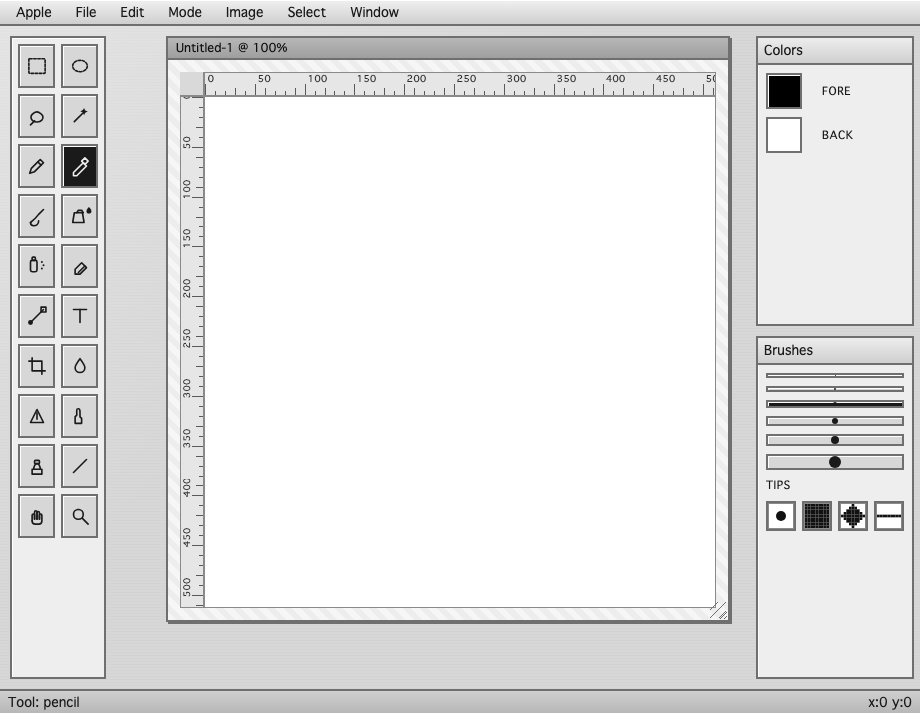
It made a lot of progress but had a couple of issues that required more prompting. The main image was drawing as pure white, even though the tools were clearly working. I could load an image or use the pencil, then confirm with the eyedropper that pixels were colored, so it was just a drawing issue. Additionally, menu items were only visible on hover, presumably the font was the same color as the menu background. And the tools were represented by letters rather than icons, and organized into a single column rather than a two-column layout. I told it about the bugs and it fixed them. I also had an unrelated local serving issue that prevented testing at all, and the agent resolved that in the transcript too.
OK. Some issues I've seen. The main menu elements don't show text until I hover them, they might be the same color as their background. And the toolbar on the left shows letters instead of drawing icons for the tools, and is only 1 column wide where the original is 2 columns wide.
the actual image, even though i think it is correctly editing the image and such, is always displaying as a white canvas, even if i laod an image or draw on the image or use paint bucket etc etc. eyedropper shows it really does have the pixels, saving image works, but it's just displayed as a white canvas. after fixing that you can continue the refreshChannelMenu task
(I mention a "refreshChannelMenu task" because I had interrupted whatever it was doing in order to prompt this.) After that I queued up this prompt to execute up to 35 times and then went shopping:
Commit to git. Then, MISSION: Continue until the full 1:1 port is completely done. Just keep going.
In the end it executed for 3h 58m total (according to a later agent-session's analysis of the transcript.), although it only got through the queued prompt 5 times, adhering a little better than I expected to the prompt to "Just keep going."
Later that night I queued up a large number of a similar prompt and went to bed.
Commit to git. Then do a comprehensive review of missing features. MISSION: Reach full 1:1 parity with the original port in @original-source/. Update CHECKLIST.md with features that are still missing. Then complete the most important one. MISSION: Continue working in this way until full 1:1 parity is reached.
This executed 61 times and took 7h 4m total while I slept.
By the end, the agent had started claiming in response to each prompt that there were no missing features. Of course, I don't know what functionality might be wrong or missing, but everything I tested worked, save for one UI issue. I could not drag the main editing window around, and I had to tell it the bug was still there something like 6 or 7 times before it manage to fix it. Unfortunately the transcript is missing the last few prompts for this because I had accidentally intermixed my session with another task at that point.